Une story map est une carte qui montre la UX depuis la perspective (supposée) du Produit.
Elle est différente d’une Experience Map car elle aborde les activités, étapes et détails liés à l’utilisation du Produit.
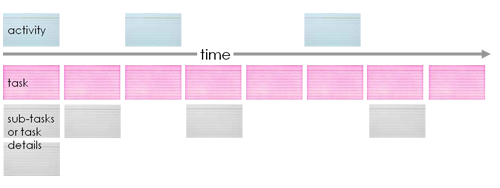
Definition of story map attributes
Activity An activity is sort of a big thing that people do – something that has lots of steps, and doesn’t always have a precise workflow. A story for an “activity” might read:
«As a consultant I want to manage my email so I can keep up with clients, colleagues, and friends»
But that’s way too big of a story to put into an iteration or sprint. That’s why we break it down :
Tasks That big story breaks down into other stories like “send message,” “read message,” “delete message,” “mark message as spam” – stuff like that. I call these user tasks. Really a task is something that someone does to reach a goal. A user task is what users do to reach their goals.
Useful for Priorization in Product management
When it comes time to prioritize stories, I don’t prioritize the backbone. It just “is.” I do prioritize the ribs – the stories hanging down from the backbone.
Place them high to indicate they’re absolutely necessary, lower to indicate they’re less necessary. When you do this, you’ll find that all the stories placed high on the story map describe the smallest possible system you could build that would give you end to end functionality (or MVP)
When it’s time to plan releases, it’s usually not important to prioritize backbone items against each other. For instance if I were to build a high level backlog for a car it might look something like this:
- engine
- transmission
- brakes
- suspension
- … It would be stupid to ask stakeholders to prioritize the backbone: “what’s more important, the engine or the transmission?” – or “we don’t have enough time in this release, could we release without brakes and add them later?” These items are essential
Where the prioritization comes in is below this level: 4-cylinder engine or 6-cylinder engine? brakes with anti-locking or brakes without? sport suspension or not? It’s how we build up those backbone items – prioritize their characteristics that matters.
When you prioritize a story map, you’ll move cards or stickies up and down to indicate high or low
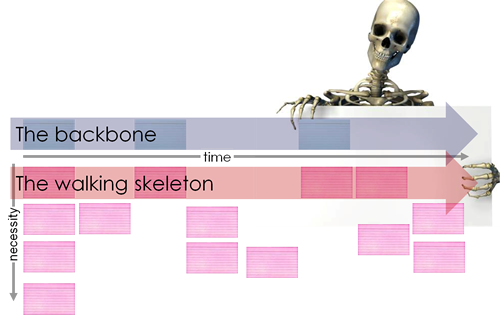
When adding features to an existing product (it already has a backbone), I find it useful to stilly identify the backbone to help me get context – to help me see where new features are being placed.
On some projects adding just a few features to a large existing product, it’s been difficult to talk people into building up a story map for just a few features. In these cases, I’ll simply prioritize the new features, then for each feature build a little story map to prioritize the user stories that make up that features. Each little story map may have 10 or so cards – but they’re still arranged left to right, and top to bottom so we can focus on building a little-tiny-walking-skeleton of the features as early as possible.
Source :https://jpattonassociates.com/the-new-backlog/
Finding Assumptions with a story map
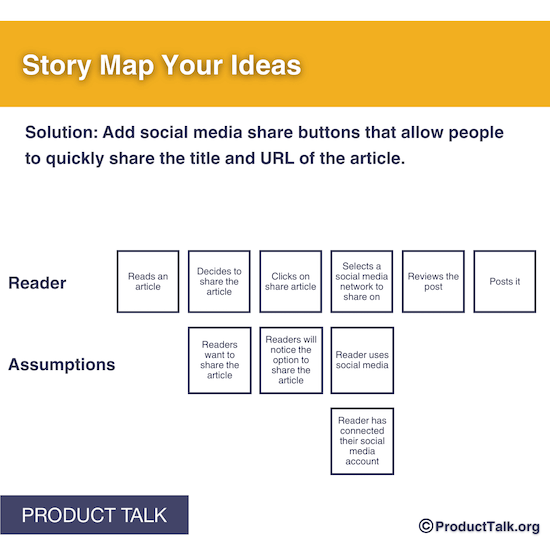
You can create a row for assumptions below the row for tasks like this :